

Key Takeaways
- Now available on Android 10+, this feature uses QR codes to verify that your end-to-end encrypted conversations are with the correct person.
- Messages will now warn you if you try to click a link in a message marked as spam, preventing accidental visits to harmful websites.
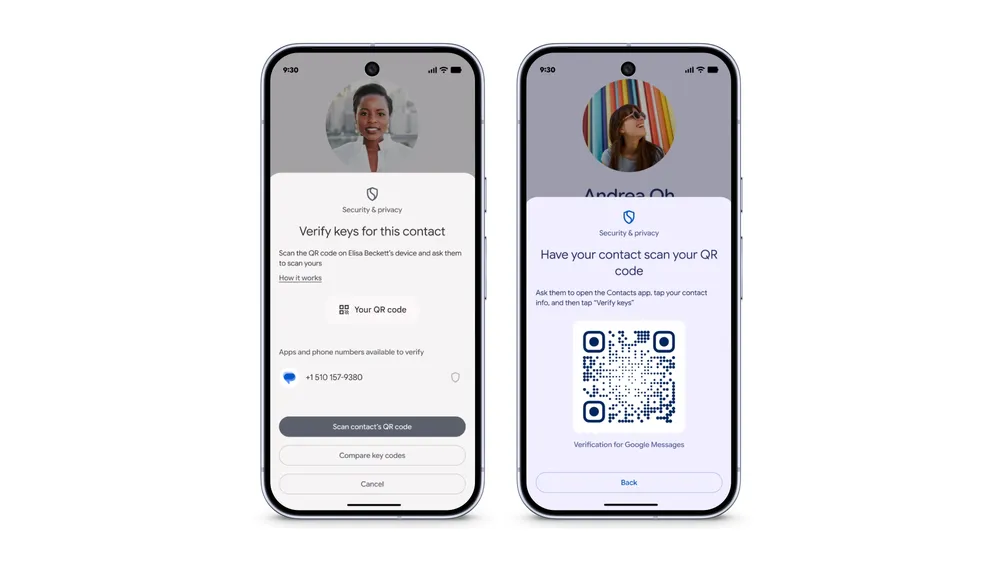
- You and your contact scan each other’s QR codes within the Messages app to confirm your encryption keys match.
- The spam link detection feature is now available to all users globally.
Google is rolling out two significant new safety features for its Messages app, aimed at protecting users from impersonators, fraudsters, and malicious links.
The first major update is the official launch of Key Verifier for all Android 10+ users. This feature adds an extra layer of security to your end-to-end encrypted RCS conversations by giving you a way to confirm you’re talking to the right person. It’s designed to protect against sophisticated attacks like SIM swapping or “man-in-the-middle” attacks, where a third party tries to intercept your messages.
To use Key Verifier, both you and your contact need to open your conversation, tap their name, and select “Verify keys.” You’ll then scan each other’s QR codes. Once completed, you’ll see a “Keys verified” confirmation, giving you extra assurance that your conversation is private. If the keys ever change—due to a new phone, for example, or a potential security issue—the app will warn you that the “Keys no longer verified.”
The second new feature, which is now available globally, tackles the problem of malicious links in spam messages. If you receive a text that Google identifies as spam, Messages will now actively warn you before you can visit a potentially harmful website from a link in that message. You’ll be stopped from visiting the site unless you manually override the warning by marking the message as “not spam.”

These updates are part of Google’s ongoing effort to make digital communication safer and more trustworthy for its users.

Your First 10 AI Skills
10 practical AI skills, copy-paste prompts and a 7-day plan to start using AI with confidence.
Download the guide →