

Key Takeaways
- You can now designate trusted friends or family members who can help verify your identity to get you back into a locked account.
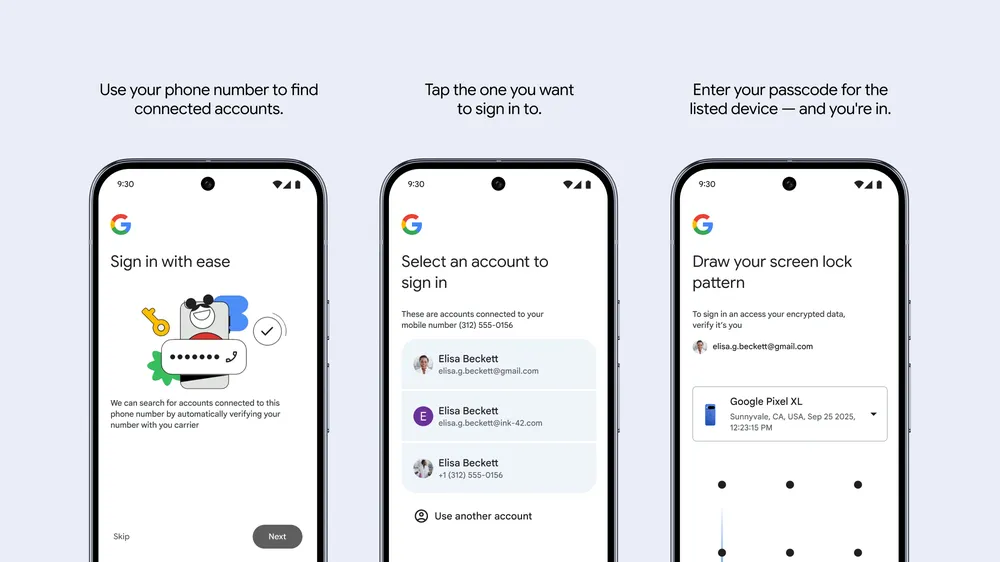
- A new Android feature lets you use your phone number and the lock-screen passcode from your old device to recover your account on a new phone.
- These features are part of a broader security push from Google to better protect users against scams and hackers.
Getting locked out of your Google account can be a major headache. Forgetting a password or passkey often leads to a frustrating cycle of security questions and recovery emails. Now, Google is introducing new tools designed to make that process simpler and more secure by letting the people you trust help you out.
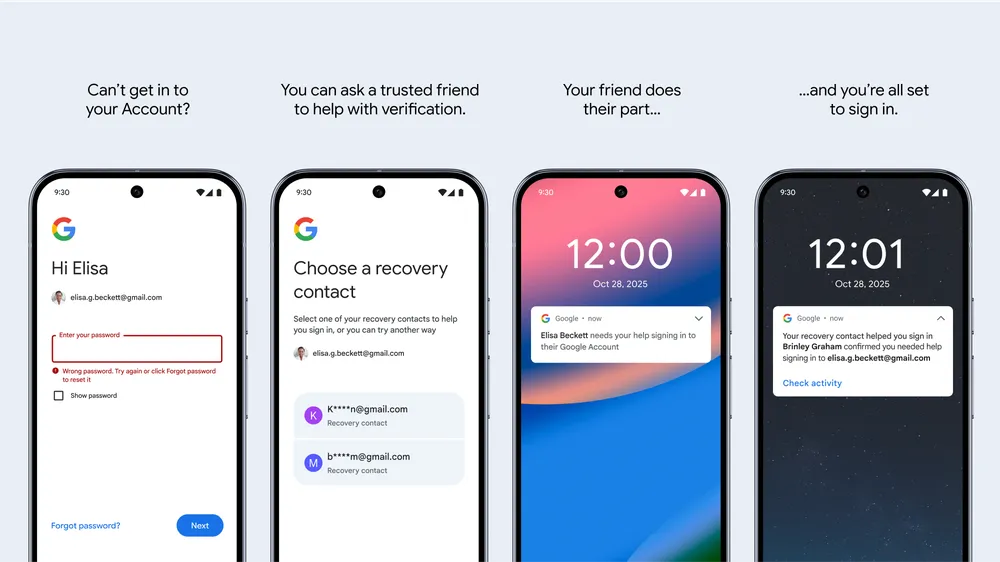
The headline feature is Recovery Contacts. This new option, available for personal Google accounts, allows you to designate specific friends or family members who can vouch for your identity if you get locked out. When standard recovery methods fail, these trusted contacts can help you regain access. While Google hasn’t detailed the exact verification process, the feature provides a secure alternative for those moments when you can’t remember the name of your first pet. You can set up Recovery Contacts in the “Security” section of your Google account settings.
For Android users, Google is also launching Sign in with Mobile Number. This tool is designed for situations where you’ve lost access to your old phone and need to sign into your account on a new one. Instead of requiring a password, it uses your linked phone number and asks for the lock-screen passcode from your previous device to verify your identity. Google has stated this feature is being rolled out gradually to users worldwide.
These new recovery options are part of a wider security expansion at Google. The company is also enhancing Google Messages with warnings for spam links that might lead to malicious websites and has introduced a “Key Verifier” to help users confirm the identity of their contacts and avoid impersonation scams.

Your First 10 AI Skills
10 practical AI skills, copy-paste prompts and a 7-day plan to start using AI with confidence.
Download the guide →